> ## Documentation Index
> Fetch the complete documentation index at: https://chainlit-5-laura-eng-1066-landing-page.mintlify.site/llms.txt
> Use this file to discover all available pages before exploring further.
# Score
Scores are a crucial part of developing your LLM application or agent.
They allow your users to manually evaluate their interactions with your application, which can be used
to improve the performance and accuracy of your system.
Scores may also be generated by AI via automatic evaluations.
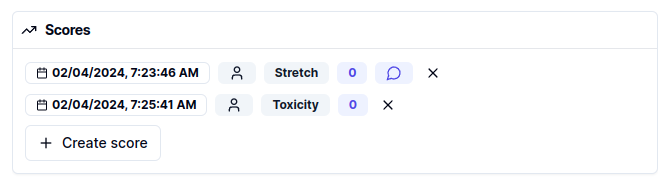
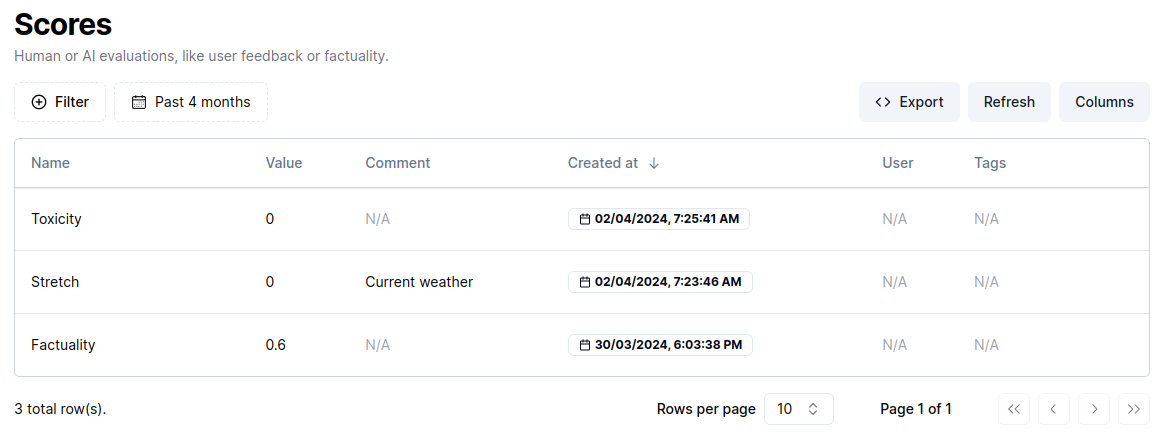 Scores are tied to a Step or a Generation. As such, they appear in their respective info panels:
 ### Create a score
#### From the application
The Literal application offers an easy way to manage scores: Score Templates.
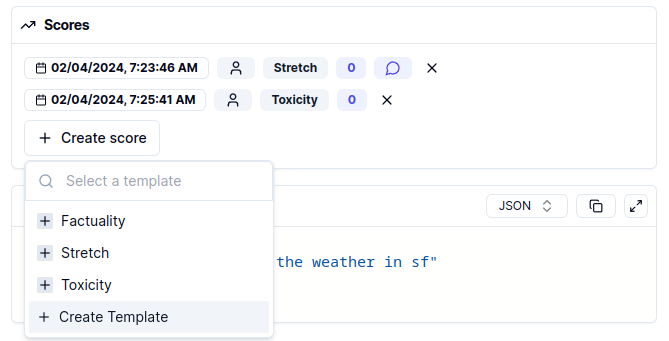
To create a Score Template, click on "Create score" and select the "Create Template" option:
### Create a score
#### From the application
The Literal application offers an easy way to manage scores: Score Templates.
To create a Score Template, click on "Create score" and select the "Create Template" option:
 Via Score Templates, admin users can control and expose to users the various types of evaluations
allowed from the application. Score Templates come in two flavors: *Categorical* and *Continuous*.
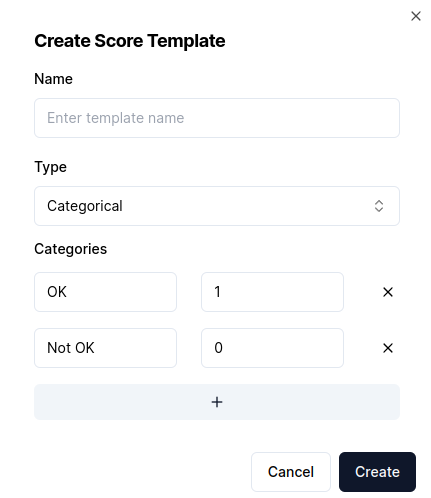
*Categorical* templates let you create a set of categories, each tied to a numeric value:
Via Score Templates, admin users can control and expose to users the various types of evaluations
allowed from the application. Score Templates come in two flavors: *Categorical* and *Continuous*.
*Categorical* templates let you create a set of categories, each tied to a numeric value:
 *Continuous* templates offer a minimum and a maximum value which users can then select from to score.
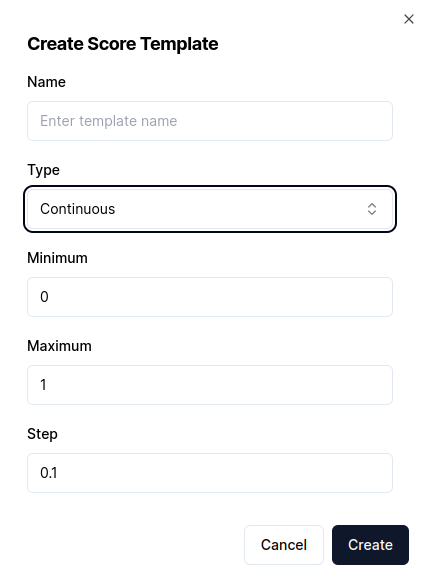 From a Step or a Generation, admins can then score by selecting a template and filling
in the required form fields.
Scores can be deleted individually from a Step or a Generation via their delete button.
By default, any admin user may create a score template. Deletion is left in the hands of
project owners, from the Settings page.
#### Programmatically
The SDKs provide score creation APIs with all fields exposed. Scores must be tied either
to a Step or a Generation object.
```python Python
score = await client.api.create_score(
step_id="",
generation_id=""
name="user-feedback",
type="HUMAN",
comment="Hello world",
value=1,
)
```
```typescript TypeScript
const score = await client.api.createScore({
stepId: '',
generationId=""
name: 'user-feedback',
type: 'HUMAN',
comment: 'Example score',
value: 1,
});
```
The example below highlights how you can receive human feedback on a
FastAPI server by calling the `create_score` API in Python.
```python server.py
from fastapi import FastAPI
app = FastAPI()
class HumanFeedback():
step_id: str
value: float
@app.post("/feedback/")
async def receive_human_feedback(feedback: HumanFeedback):
# Create a score on the `Step` the user gave feedback for.
return client.api.create_score(
type=ScoreType.HUMAN,
name="user-feedback",
value=feedback.value,
step_id=feedback.step_id,
)
```
From a Step or a Generation, admins can then score by selecting a template and filling
in the required form fields.
Scores can be deleted individually from a Step or a Generation via their delete button.
By default, any admin user may create a score template. Deletion is left in the hands of
project owners, from the Settings page.
#### Programmatically
The SDKs provide score creation APIs with all fields exposed. Scores must be tied either
to a Step or a Generation object.
```python Python
score = await client.api.create_score(
step_id="",
generation_id=""
name="user-feedback",
type="HUMAN",
comment="Hello world",
value=1,
)
```
```typescript TypeScript
const score = await client.api.createScore({
stepId: '',
generationId=""
name: 'user-feedback',
type: 'HUMAN',
comment: 'Example score',
value: 1,
});
```
The example below highlights how you can receive human feedback on a
FastAPI server by calling the `create_score` API in Python.
```python server.py
from fastapi import FastAPI
app = FastAPI()
class HumanFeedback():
step_id: str
value: float
@app.post("/feedback/")
async def receive_human_feedback(feedback: HumanFeedback):
# Create a score on the `Step` the user gave feedback for.
return client.api.create_score(
type=ScoreType.HUMAN,
name="user-feedback",
value=feedback.value,
step_id=feedback.step_id,
)
```